Designing with Childcare Register Log Book KDP Interior
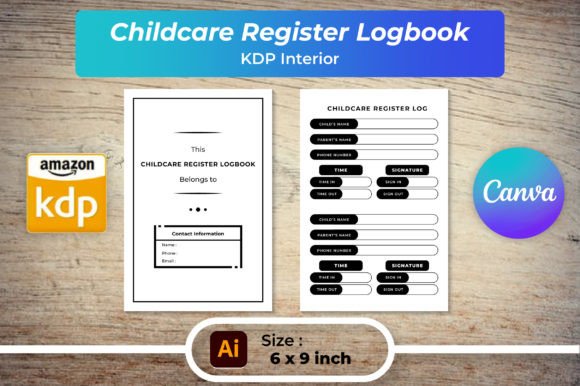
Every well-run childcare setting depends on seamless organization, but from a visual design lens, a Childcare Register Log Book KDP Interior is far more than an administrative checklist. It’s a versatile creative asset that merges function with clean graphic design, giving designers, small business owners, and content creators a fully customizable foundation to build polished, print-ready products. This interior package—delivered with editable Ai, EPS, SVG, and layered PDFs—invites immediate control over typography, color palette, and layout, making it a smart starting point for anyone who values modern aesthetics and efficient design workflow.
Why Visual Design Matters in Low-Content Interiors
When we talk about KDP interiors, it’s easy to fixate on usability alone. Yet every registration table, attendance grid, and note section communicates through visual hierarchy. A well-structured logbook reflects professionalism and builds trust. Using a thoughtfully designed interior template ensures the final product feels cohesive, whether it’s printed at a local shop or delivered as a digital download. Designers can harness the included high-resolution PNG and JPG files (300 DPI, 6×9 inches, fully resizable) to mock up packaging or social media graphics that showcase the logbook in real-life scenarios. The editable source files allow you to swap in brand-specific colors, adjust column widths for better readability, or introduce subtle decorative elements that align with a childcare center’s playful yet organized identity.
Core Design Files and Their Creative Potential
The package contains a range of vector and raster formats, each suited to different graphic design tasks. Here’s how they can amplify creative projects:
- Editable AI and EPS files — Ideal for deep customization in Adobe Illustrator. Adjust stroke weights, experiment with sans-serif typefaces for a cleaner look, or integrate custom icons that reinforce a nurturing brand identity.
- SVG files — Perfect for web design and UI mockups. Embed logbook previews into childcare service websites or digital marketing landing pages with crisp, scalable graphics that maintain sharpness on any screen.
- PNG and JPG files — Use these for fast social media content. Create Instagram carousel posts, Pinterest pins, or Facebook ads that highlight the logbook’s interior layout, applying consistent filters or overlays to match your overall branding.
- Multiple PDF page counts (100, 110, 120 pages) — Offer flexibility for different product bundles, letting you test which format resonates best with your audience without redesigning from scratch.
Establishing a Strong Brand Identity Through Print-Ready Templates
For childcare entrepreneurs launching their own line of organizational tools, brand identity lives in the details. The interior’s default structure already respects visual hierarchy—headers, recording fields, and divider lines are positioned logically. But by customizing the color palette to match existing marketing materials, you extend brand recognition into everyday use. Imagine a pastel accent hue drawn from the center’s logo applied to table borders or section titles. Maintaining this consistency across print design and digital products reinforces professionalism and makes the logbook instantly recognizable in a competitive market.
Enhancing Readability and User Experience
Good graphic design prioritizes the end user. When customizing your Childcare Register Log Book KDP Interior, pay close attention to typography choices. A clean, slightly rounded sans-serif can evoke warmth without sacrificing clarity, while well-spaced line heights reduce visual clutter. Keep column alignment strict and margins generous—this white space improves the user experience for caregivers who jot down attendance quickly during busy mornings. Scalability is another crucial factor: because the base files are vector-based, resizing to A4 or letter does not degrade quality, ensuring physical logbooks and digital PDFs alike remain crisp and easy to read.
Practical Applications Across Design Disciplines
The versatility of this interior stretches beyond its primary use. Here are several ways graphic designers and marketers are incorporating such assets into broader workflows:
- Branding and logo design — Use the logbook’s layout as a background texture in brand style guides or swipe files, reinforcing the childcare niche visually.
- Social media graphics — Layer a screenshot of the customized interior on a mockup of a wooden desk with crayons and coffee, creating relatable visual storytelling that boosts engagement.
- Editorial design — Incorporate a page spread into a lookbook or catalog for a stationery brand, illustrating how the interior fits a “cozy yet structured” theme.
- Packaging design — If the logbook is sold as a physical product, the same editable files can inform the cover design, spine, and barcode placement, maintaining a unified aesthetic.
- UI and web design — Placing clean vector previews on sales pages or in app prototypes helps potential buyers visualize the product immediately, reducing bounce rates and improving conversion.
- Presentations and client pitches — Freelance designers can showcase the customizable interior as part of a larger brand identity package for childcare services, demonstrating attention to detail.
Design Tips for Customizing Your Interior
To get the most out of the template, align each design choice with the audience’s expectations. Caregivers and center directors value clarity, speed, and a sense of calm. Resist the urge to overcrowd pages with decorative elements that fight for attention. Instead, use accent colors sparingly—perhaps a soft mint green for date headers—to guide the eye naturally. Test your composition by printing a sample page: does the type remain legible at actual size? Does the layout still feel balanced when filled with handwritten entries? These quality checks keep the product useful and visually appealing, reinforcing the value of a Childcare Register Log Book KDP Interior as both a functional tool and a design-savvy solution.
Integrating with Digital Marketing and Visual Storytelling
Once your customized interior is ready, the same design assets fuel your promotional efforts. Pull a high-resolution JPG into a Canva template, overlay a compelling headline, and you have a social media post that feels native yet professional. For email marketing, a subtle SVG icon of a logbook page can improve click-through rates by adding visual intrigue. Across all these channels, the design consistency you established during customization pays off, turning a simple logbook into a recognizable product that stands out.
Quality creative assets don’t just save time—they elevate the entire design workflow. A professionally structured Childcare Register Log Book KDP Interior empowers you to skip tedious setup, focus on personalization, and produce a final result that marries usability with refined graphic design. Whether you’re building a brand, expanding a product line, or refreshing marketing materials, the intentional choices you make around typography, color, and layout will shape how your audience perceives the care you put into every detail. In a market flooded with generic templates, thoughtful visual design is the clearest signal of quality—and the fastest path to genuine connection.