Mileage, Trucker, Gas Log Books: What You Need to Know Before You Buy or Create One
Whether you're a self-publisher building a profitable KDP catalog or a business owner who simply needs a reliable way to log miles and fuel, the right log book interior can make all the difference. This particular download brings together three distinct types — mileage logs, trucker logs, and gas log books — all formatted and tested for Amazon KDP. You get high‑resolution pages in three popular trim sizes, with no‑bleed design and an impressive range of file formats. At first glance, that sounds like a straightforward purchase. Yet many people still stumble over small details that create big headaches later. Let's walk through what often gets overlooked, why those missteps matter, and how you can make a confident choice with a resource like this.
Why These Three Log Book Types Are Often Misunderstood
A mileage log, a trucker log, and a gas log book might sound similar, but they serve very different needs. One common mistake is treating them as interchangeable templates. An IRS‑ready mileage log should capture date, destination, purpose, and odometer readings for tax‑deduction documentation. A trucker log needs to mirror hours‑of‑service requirements, often including grid layouts for duty status changes and certification lines. A gas log book, on the other hand, is all about tracking fuel purchases, cost per gallon, and vehicle performance over time. If you upload a generic layout thinking it covers all three, your buyers will notice — and your returns or bad reviews will follow. This download sidesteps that problem by supplying dedicated, purpose‑built interiors for each type. You don't have to modify a mileage layout into a trucking compliance log at 2 a.m.
The “No Bleed” Advantage and Why It Gets Ignored
KDP interiors are either bleed or no‑bleed. Bleed means your design extends to the edge of the page, requiring you to account for trimming. No‑bleed means you have a safe margin all around, and the entire content sits well inside the page boundaries. Many first‑time publishers overlook this and accidentally buy a bleed template when they actually want a simple, clean interior. The result is a rejected upload or, worse, a printed book where crucial text gets sliced off. The Mileage, Trucker, Gas Log Books collection is designed specifically as no bleed. That means you won't wrestle with extra margins, safety lines, or resizing. Everything stays where you expect it to, page after page. Before you click that final publish button, always verify the interior file’s bleed setting. This package removes that guesswork entirely.
Size Matters, and Three Options Beat One
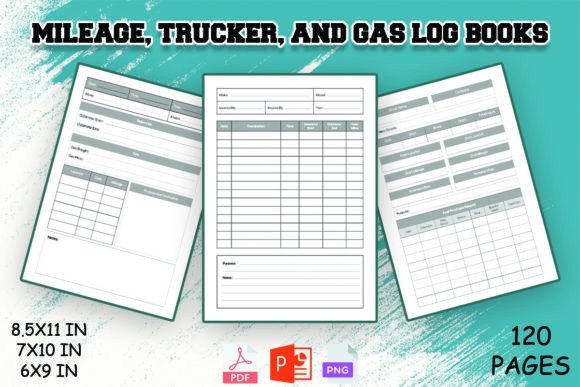
Another quiet mistake is committing to a single trim size that doesn't match your audience's expectations. A driver who wants to keep a logbook in the glovebox might love a compact 6 × 9 inch format. A fleet manager preferring a clipboard‑friendly page might reach for the 8.5 × 11 inch version. The 7 × 10 inch sits nicely in between — large enough to write in comfortably without being unwieldy. When you only have one size, you force everyone into the same box. This download gives you all three, so you can publish multiple product variations from a single source or test which trim sells best in your niche. The real takeaway: before you list any log book on Amazon, check what competitors offer and consider whether your customers need a portable or a desk‑friendly format. Having the flexibility in hand from day one saves you from re‑formatting later.
High-Resolution Isn’t Just a Buzzword
You'll often see “high‑resolution” in product descriptions, and many buyers assume that's enough. In reality, interior pages intended for print must hit at least 300 DPI at the final trim size. Some templates are only 150 DPI, which looks acceptable on screen but prints soft or slightly fuzzy. KDP’s automated system can flag low‑resolution images, or you might only discover the problem after receiving author copies. The log book interiors in this package are genuinely high‑resolution, purpose‑made for clean, crisp lines and text. When you inspect the files, zoom into a table border or small header — it should remain razor‑sharp. That's the standard here. And if you ever customize pages in the included PPT or edit the source file, never aggressively enlarge raster elements; keep the original pixel dimensions to maintain that print quality.
Why File Variety Matters More Than You Think
Many KDP interior downloads arrive as a single PDF, and that's fine until you want to make even a tiny adjustment. Maybe you need to add your company logo, tweak a column heading, or change “Trip Purpose” to “Client Name.” Without the editable source file, you're stuck. The Mileage, Trucker, Gas Log Books release provides PPT, PDF, JPEG, and PNG formats. That opens up several workflows:
- PDF – direct upload to KDP with zero fuss.
- PPT – effortless editing using PowerPoint or Google Slides; great for beginners who don't own Adobe software.
- JPEG and PNG – useful for creating product mockups, social media previews, or slipping individual pages into larger planners you might design.
Even if you only use the PDF today, you'll appreciate having the editable version six months later when KDP category trends shift and you want to refresh the interior with a different subtitle or brand name. Avoid the mistake of buying a “print‑ready” PDF and then discovering you can't touch a single period. The multi‑format approach here keeps your options open.
Checking KDP Compatibility Before the Clock Runs Out
“Ready to upload KDP” is a promise, but smart creators still run a quick sanity check. Open the PDF in Adobe Acrobat Reader and confirm the page count matches your manuscript. Ensure there's no password protection. For no‑bleed files, confirm the printed content stays at least 0.375 inches from the edges (or whatever guideline you're following). With the Mileage, Trucker, Gas Log Books interior, these details have been tested, but it's a good habit to upload the file to KDP's previewer and flip through every page. Look for clipped elements, font issues, or unexpected blank pages. This extra step takes five minutes and prevents a lot of inboxes full of “content errors” emails. Additionally, if you're planning to use the JPEG or PNG versions to compose your interior in another program, always re‑export at 300 DPI and with the correct trim size. One misplaced resize can introduce blurriness that the original high‑res file never had.
Realistic Examples of Poor Choices (and Better Alternatives)
Imagine someone buys a trucker log template with only 60 pages. They list it on Amazon as a “6‑Month Daily Log,” but a full‑time driver fills 31 days a month. The page count doesn't make sense. Now they're dealing with return requests and negative feedback. A better approach is to plan the page count around the intended tracking period. This package provides 100 pages per log, a comfortable span that works for quarterly or even longer mileage and fuel tracking without feeling skimpy. Another example: a seller uploads a gas log interior in 8.5 × 11 without realizing KDP's expanded distribution prefers certain trim sizes. The book gets approved but later blocked from extended channels due to a non‑standard ratio. By having the same interior in 6 × 9 and 7 × 10 right from the start, you can match the preferred specifications of different marketplaces easily. Small structural decisions like these separate a low‑stress publishing experience from a frantic one.
What to Look For Before You Download or Use Any Log Book Interior
When you're evaluating a set of mileage, trucker, and gas log books, whether this one or any other, keep a short checklist in mind:
- Interior layout completeness: Are all necessary fields present for each log type? For example, does the mileage log include a column for odometer start/end and business purpose? Does the trucker log reflect ELD‑friendly grid spacing?
- Trim size compatibility: Do the files match the trim sizes you intend to list on KDP, or are you prepared to adapt them?
- Bleed vs. no‑bleed: Confirm the product description matches the actual file setup. A no‑bleed file should have clear inner margins, not content touching the trim edge.
- Resolution: Inspect at 100% zoom — small text and table lines should be crisp.
- Editable format availability: Even if you plan to use the PDF, having PPT or another source format gives you future‑proofing.
- Licensing terms: Ensure you can use the interiors in commercial KDP projects without attending additional restrictions.
If a collection checks these boxes, you're in a good place. The download described here was built to satisfy exactly those points, and that's why it's worth taking a closer look at how it's assembled rather than grabbing the first similar‑looking template you find.
Turning a Good Interior into a Great Customer Experience
A well‑designed log book interior removes friction for the user, and that's something your buyer will feel. Thick, dark lines that are easy to photocopy; generous writing area between columns; logical grouping of fields — these details matter. When you upload the Mileage, Trucker, Gas Log Books interior, you're providing a framework that helps drivers, fleet managers, and self‑employed individuals stay organized without guessing where to write. That translates into better reviews and fewer “this book doesn't have enough space” complaints. If you customize the PPT version, avoid the temptation to shrink rows to pack more data onto one page — readability usually wins over density, especially for something often filled out while sitting in a vehicle.
Stepping back and considering how these three log types work together also opens up bundling opportunities. A single KDP listing could pair the mileage log with the gas log as a “Vehicle Expense Tracker Duo,” offering two books for one low price. The fact that all three formats share the same design language means they feel cohesive side by side. That's a subtle but powerful way to strengthen your brand as a publisher who cares about the user's real‑world workflow, not just churning out generic blanks.
Ultimately, the biggest mistake anyone can make is treating KDP interiors as interchangeable commodities. They're not. A template that skips a single column can ruin a tax audit for someone, or force a trucker to recalculate duty hours manually. By choosing a tested, multi‑format package like the one described here, you sidestep those hidden landmines. You get a set of pages built with practical use in mind, delivered in formats that let you publish immediately or tweak until everything feels just right. That's the kind of head start that saves time, protects your seller reputation, and puts a genuinely useful product into the hands of people who need it.