Editable 2024 Wedding Planner Canva KDP Templates
Planning a wedding is equal parts thrilling and overwhelming. Every detail counts, from guest lists to monthly budgets, wardrobe fittings to honeymoon itineraries. An Editable 2024 Wedding Planner Canva KDP takes that chaos and transforms it into a calm, beautifully structured experience – one that doesn’t just help organize a real wedding, but becomes a powerful design asset for entrepreneurs, stationers, and publishers. Whether you are a bride-to-be craving an all-in-one personal planning system or a creative business owner building a ready-to-publish Amazon KDP product, this versatile toolkit adapts to your vision while maintaining a polished, cohesive identity.
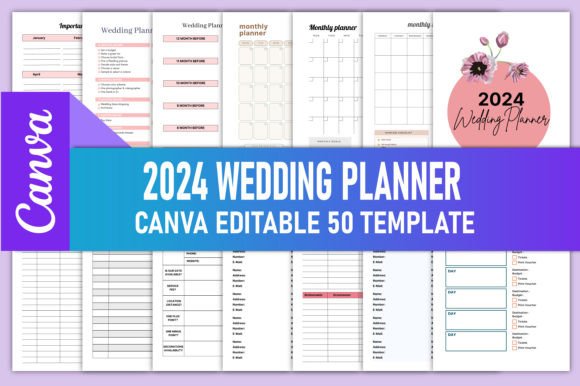
Far more than a simple checklist collection, this planner is a carefully composed 50-page interior that balances romance and clarity. It arrives as high-resolution PDF, PNG, and JPG files, plus the real game-changer: an editable Canva link. With a few clicks, you can tweak colors, replace text, add your branding, or reimagine the entire aesthetic to suit a specific wedding theme, style guide, or target audience. The files are KDP tested, set in CMYK color mode at 300 DPI, sized at 8.5 x 11 inches without bleed – the gold standard for seamless Amazon uploads and professional print results.
What’s Inside the Wedding Planning Toolkit
At its core, the planner functions as a comprehensive operational manual for wedding preparation, structured to guide couples from the engagement high all the way to post-vow bliss. The Belongs To page personalizes the experience immediately, while the 2024 calendar and monthly planner set the macro timeline. More granular sections break every task into manageable steps: a Wedding Planner Checklist for overarching milestones, a Wedding Day Budget Planner to track expenses against reality, and dedicated Bride and Groom preparation sheets that align both partners.
What makes the Editable 2024 Wedding Planner Canva KDP Interiors feel truly complete is the inclusion of often-overlooked elements. A Wedding Guest List and a secondary WEDDING DAY Guest List help manage RSVPs and seating, while a Rehearsal Preparation page ensures the rehearsal dinner doesn’t become an afterthought. The Sketch Wedding Timeline Planner lets you visualize the event flow, and the Wedding Ceremony Tracker keeps vows and readings on point. A detailed Expense Wedding To-Do List, Venues Comparison chart, and Wedding Party Contact Lists – including spaces for Groomsmen, Flower Girls, and Ring Bears – turn scattered notes into an actionable, shared resource.
Self-care and celebration get equal weight, which is rare in planning tools. Gift Ideas pages for the wedding party, a Honeymoon Planner, Notes, and Important Dates round out the practical side. Then gently unexpected touches appear: a Morning-to-Evening Skin Care Routine tracker, a 30 Day Self-Care Challenge, and a Glowing Skin Challenge. These pages speak directly to modern couples who see wedding preparation as a holistic life moment, not just a logistics puzzle.
Design Personality and Visual Appeal
The visual language of this planner leans into modern minimalism with a soft, editorial touch. Typography choices – which you can adjust in Canva – typically balance airy, understated elegance with enough structure to make dense information feel digestible. The original design likely favors clean lines, ample white space, and a restrained color palette that evokes understated luxury rather than shouty bridal clichés. This intentional restraint gives the planner an elevated commercial feel, positioning it as a premium design asset rather than a quick DIY printout.
Because the Canva template is fully editable, the personality can shift dramatically. Keep the base aesthetic for a mainstream bridal market, or introduce earthy tones, blush pastels, or even bold modern contrasts. For a KDP entrepreneur targeting boho weddings, you might layer in watercolor botanicals and a hand-lettered title page. For a minimalist city wedding audience, stick to monochrome grids and sans serif clarity. The structural bones of the planner support any creative direction while preserving the proven information architecture.
Where This Planner Works Best Across Projects
This product thrives at the intersection of personal use and commercial publishing. For individual brides or wedding planners, it becomes a centralized command center – printable at home, local print shops, or uploaded to an iPad for digital planning. The editable nature means you can remove pages you don’t need, duplicate ones you love, or adjust month names to start your planning season whenever it makes sense.
For small business owners, the applications multiply. A stationery designer can white-label the interiors, pair them with custom covers, and sell hardcopy or digital versions through their own e-commerce store. A blogger or content creator might offer the planner as a lead magnet, rebranded with their logo and color scheme. KDP publishers, of course, get a direct path to market: download the print-ready PDF, add your cover design, and publish to Amazon’s massive audience. Because the files are tested for KDP, headaches around formatting, margins, and color accuracy virtually disappear.
Wedding industry professionals – photographers, coordinators, stying teams – can customize the planner as a client gift or upsell, embedding their branding to stay top of mind. Even crafters and hobbyists benefit: imagine bundling the planner with printable wedding signs, envelope liners, and favor tags, all designed cohesively around the same Canva color palette. The editable nature invites this kind of expansion without demanding advanced graphic design skills.
Building Consistency, Professionalism, and Recognition
Brand identity depends on repetition and visual harmony. When a business offers a suite of wedding-related products, from planning binders to day-of timelines, using a consistent design language across every page creates instant trust. The Editable 2024 Wedding Planner Canva KDP Interiors serve as the anchor for that system. You can carry the same typographic scale, color accents, and icon style into supplementary assets – a coordinating guest book, signage, or email templates – reinforcing that you understand a couple’s aesthetic on a deep level.
For KDP publishers, the professional finish of these interiors reduces bounce rates in the “Look Inside” preview. Readers scanning Amazon want to see clear tables, legible text, and balanced layouts. A disorganized interior signals amateur production; a spacious, thoughtfully layered spread communicates reliability. The immediate visual hierarchy guides the eye naturally from section headers to body text to actionable checkboxes, making the planner intuitively usable even before purchase. This perceived quality translates directly into higher conversion rates and better reviews.
Practical Guidance for Choosing and Customizing Your Template
Before you hit “edit” in Canva or upload a PDF to KDP, spend a few minutes evaluating your end goal. Who is the primary user? If you’re designing for a wedding planning business clientele, keep flexibility high and color schemes neutral enough to fit diverse wedding styles. If you’re targeting a specific niche on Amazon – say, rustic barn weddings or tropical destination events – adjust the entire mood board early to attract those buyers.
Start by reviewing the included pages list carefully. The 50-page count gives you room to remove redundancies or add supplementary sheets. In Canva, test font pairings that remain highly readable at small sizes, especially for dense forms like guest lists and expense trackers. A delicate script might look gorgeous on a cover, but in a 10-point budget table, it becomes a legibility nightmare. Stick to tried combinations: a crisp sans serif for data-heavy sections, a refined serif or softened sans for headings. Maintain a clear typographic scale – prominent for section titles, medium for subtasks, compact for body content – to keep visual hierarchy sharp.
Check commercial licensing carefully. While the product description states it is KDP ready and editable, you need to verify whether you’re allowed to resell modified versions. Most KDP interior templates grant a commercial license for printing and selling physical or digital books, but always read the included terms. If you’re branding the planner for your own services, the license is usually straightforward. When in doubt, a quick message to the seller can clarify derivative work permissions and prevent future issues.
Elevating Readability and the User Experience
A wedding planner’s real test happens when a stressed-out couple opens it weeks before the event. The layout must work hard to reduce cognitive load. Check that all boxes align precisely, that there’s enough writing space beneath each prompt, and that no page feels so crowded that it’s discouraging to fill out. The 8.5 x 11 inch format provides a generous canvas – use it wisely. Avoid shrinking margins too far; a little breathing room around the edges makes a printed page feel luxurious and considered.
If you keep the planner in its original digital form, test how it renders on a tablet. Hyperlinked tabs can transform navigation, and Canva allows you to add those if you’re selling a PDF for digital use. For print, ensure that black text is truly 100% K and not a rich black blend that might cause registration issues during printing. The core of good readability isn’t just typography – it’s the thoughtful rhythm of content, the clarity of categories, and the intuitive flow from one planning domain to the next.
Real-World Applications and Creative Expansions
Consider a stationery designer who runs a small Etsy shop. She downloads the editable Canva template, adjusts the palette to incorporate her brand’s signature muted sage and terracotta shades, and adds a subtle logo treatment to the footer of each page. Within an afternoon, she has a premium wedding planner ready to list as a digital download or print-on-demand product through a fulfillment partner. Because the PDF is already KDP tested, she can also publish a low-content paperback on Amazon, tapping into a global bridal audience without managing inventory.
On the client side, imagine a bespoke wedding coordinator who brands the planner as a “complimentary planning portal” for her full-service packages. She personalizes the bride’s name on the Belongs To page, tweaks the monthly calendars to reflect their specific timeline, and drops in a few encouragement notes. The couple receives a fully tailored binder that feels exclusive, deepening their emotional connection to the coordinator’s brand. Small touches like these transform generic templates into perceived high-value touchpoints.
For hobbyists or self-publishers, the planner also opens doors to a broader product suite. Use the same design system to create a wedding finance tracker, a party contact booklet, or a bridesmaid kit. Because you’re starting from a component-based 50-page Canva interior, the design consistency practically builds itself. You’re investing in a flexible framework, not a single static document.
Thinking Beyond the Template: Customization and Brand Identity
Treat the editable Canva link as a launchpad rather than a final destination. Deepen the brand identity by replacing generic stock icons with line-art illustrations that match your visual theme. Add section divider pages with full-bleed floral imagery if your audience loves romance, or keep transitions strictly typographic for ultra-modern appeal. Small details like the shape of a checkbox or the corner radius of a photo placeholder subtly signal your design sophistication. Each decision feeds into how the user perceives the planner’s value and, by extension, your business.
A Seamless Workflow from Edit to Publication
The technical preparation for KDP matters. Always export your final Canva design as a PDF Print file, checking that all images and text are embedded, colors remain CMYK, and the 8.5 x 11 inch dimensions hold. Because the base files are supplied without bleed, you won’t need to add extra margins for trimming, simplifying the setup process. Order a printed proof copy from Amazon before listing publicly – this step catches subtle issues like line weight visibility or unexpected color shifts. Once you’re satisfied, your planner can go live as a paperback, and you can offer the digital version through Gumroad, Etsy, or your own website simultaneously.
The Editable 2024 Wedding Planner Canva KDP isn’t just a product; it’s a starting point for scalable creative work. Whether you’re organizing your own wedding with personal flair or launching a branded line of stationery products, this fully editable asset meets you exactly where your skill level and ambition intersect. The thoughtful page structure, clean visual hierarchy, and commercial-ready formatting remove the heavy lifting, leaving you space to shape something beautifully, specifically yours.