Take Control of Your Year with the Editable 2024-25 Yearly Planner
Planning a full year can feel overwhelming, especially when you need a tool that adapts to your unique schedule, business goals, or creative projects. Many people end up buying generic planners that either miss the mark or don’t allow the kind of personalization they truly need. This is where an Editable 2024-25 Yearly Planner becomes a game-changer, especially for KDP publishers, home organizers, and professionals who want a high-quality, print-ready resource they can fully control.
Instead of settling for a rigid layout, you gain a complete 2024-25 calendar paired with fully editable design elements. Whether you need to build a commercial interior to sell on Amazon KDP, craft a family command center, or produce a sleek office planner for your team, this planner puts the power of customization directly in your hands. It’s not just another template; it’s a flexible foundation for creating exactly what you envision.
The Real Challenge: Finding a Planner That Truly Fits
Most people face the same frustrations year after year. You might purchase a pre-printed calendar only to discover it lacks important sections like goal trackers, notes, or monthly reflections. If you’re a KDP seller, the challenge is even greater: you need a commercial-grade interior that looks professional, uploads flawlessly, and prints without headaches. Generic PDFs often come with bleed settings that confuse printing, or they’re locked so you can’t tweak colors, fonts, or spacing. This rigidity stops you from building a branded product or a truly personal planning system.
There’s also the problem of time. Designing a 120-page yearly planner from scratch takes dozens of hours, and even then, you might struggle with vector quality, consistent margins, or getting that clean 8.5 x 11 inch format right for US Letter paper. The goal isn’t just to own a planner—it’s to have a tool that helps you stay organized, reduces mental clutter, and, for publishers, generates income without endless technical roadblocks.
How the Editable 2024-25 Yearly Planner Solves These Problems
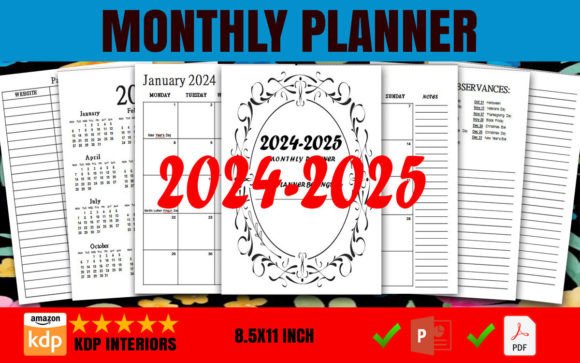
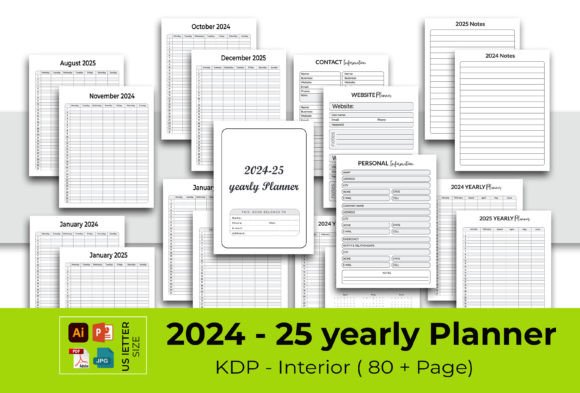
This Editable 2024-25 Yearly Planner was built to eliminate those common hurdles. At its core, it’s a print-ready interior designed for KDP, meaning you can upload it directly or print it at home or a local shop without worrying about bleeds. The file is set to US Letter dimensions (8.5 x 11 inches) with no bleed, so what you see on screen is exactly what appears on paper. You won’t lose content to trim edges or deal with misaligned elements.
What sets this planner apart is the depth of editability. You receive not just a static PDF but fully editable source files: an Adobe Illustrator CC 2019 AI or EPS file, a Microsoft PowerPoint 2016 PPT file, plus a ready-to-upload PDF and high-quality JPEG images. This multi-format approach means you can work in the software you’re most comfortable with. The vector shapes—100 of them, all resizable—give you design freedom without sacrificing quality, even at 300 dpi. Changing colors is straightforward, so you can align the planner with your brand palette, seasonal themes, or personal taste.
Practical Applications for Different Users
The beauty of an editable yearly planner is how it bends to fit your specific context. Let’s walk through a few common scenarios to see what becomes possible when you aren’t locked into someone else’s design.
For the KDP Publisher or Print-on-Demand Entrepreneur
If you sell planners on Amazon KDP or other marketplaces, standing out is everything. Using this Editable 2024-25 Yearly Planner, you can quickly create multiple niche versions: a minimalist planner for professionals, a colorful student planner, a wellness tracker, or a financial organizer. Because the interior includes 120 total pages—a cover page, a full 2024-25 calendar, and well-organized inner pages—you already have the structure in place. You simply customize the headers, color scheme, and decorative elements to match a target audience, then export and upload. The fact that it’s already tested for KDP compliance means fewer rejected files and faster time to market.
Consider a publisher who wants to launch a “boho floral” planner series. They can open the Illustrator or PowerPoint file, recolor the 100 vector shapes to soft blush and sage tones, add floral accent graphics, and keep the clean calendar grid intact. In an afternoon, they have a unique product that feels boutique, not template-driven. The PDF and JPEG backups ensure compatibility with various upload processes.
For the Home Organizer or Family Manager
Managing a household means tracking appointments, meal plans, school events, and personal goals. An Editable 2024-25 Yearly Planner lets you tailor every page to your family’s rhythm. Maybe you want a large monthly spread with dedicated sections for each family member’s top priorities, or you prefer a horizontal layout with to-do lists and grocery spots. The editable vectors and easy-to-change colors mean you can color-code by person or category—blue for work, green for kids, purple for self-care. Print it at home on your own 8.5 x 11 inch paper, punch holes, and bind it with discs or a three-ring binder. Because there’s no bleed, your desktop printer handles it without scaling errors.
One practical recommendation: use the PowerPoint file for quick home edits. Most people are comfortable with PPT, and you can duplicate slides to add extra note pages or move sections around. This lowers the learning curve and lets you prototype your ideal layout before printing the final 120-page book.
For Office Teams and Professional Use
In a corporate setting, consistency matters. A team lead can customize the planner to include project milestones, meeting cadences, and company holidays, then share the print-ready PDF with staff. The editable format means updating the cover page with the company logo and a motivational brand message takes minutes. The resizable vector shapes allow you to create custom infographics, productivity charts, or habit trackers that align with internal reporting rhythms. Printing in-house or through a professional print shop yields crisp results thanks to the 300 dpi resolution and clean US Letter sizing.
Because the file is fully editable, you’re not stuck with a single year’s design. You can create a 2024-25 version now and easily update the calendar dates for future years, making it a reusable asset rather than a one-time purchase.
Design Flexibility That Feels Natural, Not Technical
Many editable planner templates bury you in layers or require advanced graphic design skills. This one strikes a balance. The Illustrator EPS/AI file gives professional designers full control over every vector path, while the PowerPoint file empowers anyone with basic computer skills to make meaningful edits. You can change colors globally or one shape at a time, adjust typefaces, and reposition elements. The 100 included vector shapes—icons, dividers, decorative corners, and tab-like accents—are fully scalable without losing sharpness, so you can make them as prominent or subtle as you like.
A particularly useful approach is combining the provided PDF as a baseline while editing the PPT file to add your own content. For example, keep the existing clean calendar pages and focus your customization efforts on the opening pages: add an annual goals spread, a vision board placeholder, or a password tracker. This way, you get a highly personalized result without starting from zero.
Recommendations to Get the Most Out of Your Planner
To turn this Editable 2024-25 Yearly Planner into a seamless part of your routine or product lineup, consider these actionable tips:
- Start with the end in mind. Before editing, outline what sections you need. A KDP seller might want consistent weekly layouts, while a home user might prioritize monthly overviews. Having a clear structure prevents endless tweaking.
- Use color psychology to your advantage. The easy color-change feature isn’t just cosmetic. Calming blues and greens can make a wellness planner feel restorative; vibrant oranges and yellows inject energy into a goal-setting journal. Match the mood to the purpose.
- Test print early. Even with no-bleed formatting, every printer has slight quirks. Print the first few pages at home or at your local shop to ensure the colors render as expected and margins look balanced. Then adjust if needed.
- Mind the paper weight. When printing the 120-page planner, choose a paper stock that suits your binding method and usage. For messy environments like kitchens, a slightly thicker, uncoated stock may be better so pens don’t bleed through.
- Leverage the PowerPoint version for fast prototyping. If you’re new to design, PPT often feels friendlier than Illustrator. Use it to move elements, try new font pairings, and get quick feedback from family or clients before finalizing in other formats.
Why the Editable 2024-25 Yearly Planner Fits a Forward-Looking Mindset
Organization isn’t just about knowing dates; it’s about reducing anxiety and freeing up mental energy. When your planning tool truly reflects how you think and work, you spend less time wrestling with it and more time acting on intentions. This planner respects that individuality. Instead of forcing a one-style-fits-all grid, it offers a canvas where you shape the experience.
For KDP businesses, the commercial advantage is clear: you get a pre-tested interior that meets platform requirements, significantly cutting down on the trial-and-error phase. The inclusion of a ready-to-upload PDF alongside editable source files means you can launch a basic version immediately and iterate over time. And because the file size and dimensions are standard (8.5 x 11 inches, no bleed), it plays nicely with almost all print-on-demand services.
Real-World Example: Building a Self-Improvement Planner
Imagine you want to create a planner focused on personal growth for the 2024-25 academic year. You open the Illustrator file and see the clean 2024-25 calendar pages already set. To make it a self-improvement tool, you could:
- Recolor the vector shapes to a calming sage and gold palette that evokes mindfulness.
- Add a monthly reflection page after each month’s calendar spread, with prompts you write directly into the text layers.
- Design a habit tracker using the resizable shapes—small interconnected circles for days 1-31 below a list of habits you want to cultivate.
- Personalize the cover page with a motivational quote and your brand logo if you’re a coach selling this as a lead magnet.
Within a few hours, you have a complete 120-page interior that feels bespoke. The high 300 dpi resolution ensures that even small text and intricate vector details print razor-sharp. And because there’s no bleed, you don’t have to worry about background colors extending past trim lines—your final product looks professional from edge to edge.
Making the Choice That Saves Time and Elevates Quality
Whether you’re a seasoned KDP publisher or someone who simply craves a planner that actually works the way you do, the Editable 2024-25 Yearly Planner removes the friction between idea and finished product. You no longer have to compromise between aesthetics and functionality, nor do you have to be a graphic designer to achieve a clean, print-ready result. The combination of multiple editable file types, US Letter sizing, no-bleed setup, and 100 reusable vector shapes gives you a solid infrastructure to build upon year after year.
Take the first step by opening the included PowerPoint or Illustrator file and experimenting with just one page. Change the color of a header or add a small icon from the vector library. You’ll quickly see how the small edit leads to a sense of ownership and excitement about the planning months ahead. A tool that adapts to you, rather than the other way around, makes all the difference in staying consistently organized and focused on what truly matters in 2024 and 2025.