Summer Draw Write Journal for Kids KDP: A Ready-to-Publish Interior That Captures Creative Summer Moments
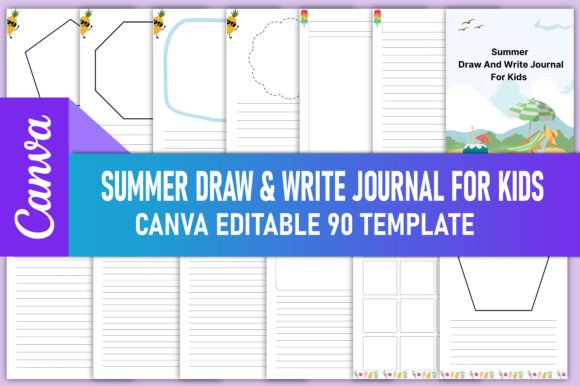
If you've ever wanted to create a kids' activity book but felt overwhelmed by page layouts, margin settings, and print file requirements, the Summer Draw Write Journal for Kids KDP interior is the kind of shortcut that makes publishing feel possible on a Tuesday afternoon, not just a someday dream. This isn't a finished book you list as-is. It's a fully formatted, 90-page draw and write notebook template delivered as a high-resolution, print-ready PDF—already sized at 8.5 x 11 inches, set in CMYK color with zero bleed, and tested to glide through Amazon KDP's automated checks. You also get matching PNG and JPG files, plus an editable Canva link that lets you add your own cover, tweak interior prompts, or drop in a personalized "This Book Belongs To" page before uploading. For anyone building a low-content publishing brand, running a classroom, offering summer engagement tools for families, or simply wanting to create a custom keepsake for a child in their life, this product sits at the intersection of practicality and creative control.
Why a Summer Draw Write Journal Hits a Real Need Right Now
Every June, parents, homeschoolers, and camp directors hunt for screen-free ways to keep kids writing and drawing. A summer-themed journal fits that gap beautifully, not as rigid academic work, but as a voluntary daily ritual. The draw-and-write format appeals because it gives children space to sketch a memory, then scribble a few lines—turning a blank page into a mini time capsule of vacations, backyard discoveries, or rainy afternoon imaginings. For the publisher, this means you're stepping into a seasonal niche that buyers search for actively with terms like summer journal for kids 8-11 or draw and write notebook for ages 6-9. When you own an editable interior like this, you can launch a product that feels timely without spending weeks on formatting. You simply adjust the Canva template, download your PDF, and list it when families are already browsing summer resources.
Where This Template Fits Into Everyday Workflows
The real value of a done-for-you interior reveals itself when you look at the different hands it touches. A kindergarten teacher preparing a summer-break packet can customize the journal with age-appropriate vocabulary, add school logos, and share it digitally with parents as a printable they can bind at home. A grandparent running a small Etsy shop might use the Canva link to change interior line spacing for younger grandchildren, then sell the revisited version as a physical spiral-bound book. A freelance blogger writing about outdoor learning could package the journal as a free download for email subscribers, keeping the community engaged long after the school year ends. And for the KDP seller who already has a handful of puzzle books or coloring interiors, this draw-and-write journal becomes a natural addition to a summer bundle, raising the average cart value without requiring entirely new design skills.
Because the interior is delivered in multiple formats—PDF, PNG, and JPG—you're not locked into one channel. You can upload the print-ready file directly to Amazon KDP, list it on Lulu or IngramSpark, or even use the individual page images to create a digital download product on Payhip or Teacher Pay Teachers. That flexibility turns a single purchase into a multi-platform asset.
Making the Journal Your Own Without Starting From Scratch
The editable Canva link is what transforms this from a static interior into a launching pad for your own ideas. When you open the template, you start with a complete 90-page structure: alternating or paired drawing boxes and lined writing sections, consistent margins, and a clean, uncoated paper-friendly aesthetic. From there, you might:
- Add a "Name and Date" header to every page for a school-yearlong project.
- Swap the generic cover placeholder for a photograph of a child's summer artwork.
- Insert occasional prompt pages—“What I heard outside my window today”—to spark guided reflection.
- Change the font to match a more playful or more mature tone, depending on the target age range.
- Duplicate the whole design and create two versions: one with wide-ruled lines for early elementary and one with narrow-ruled lines for older kids.
One practical note worth following: before you start customizing, go to your Canva home and make a copy of the document in your own account. Working on that duplicate keeps the original link active and safe, so you always have a clean fallback. This small habit saves a lot of frustration if you ever want to start over or create a variation later.
Print-Ready Means Fewer Rejections and Smoother Launches
Anyone who has ever uploaded a PDF to KDP only to watch it flagged for margins or bleed issues knows that technical preparation can eat up an afternoon. This interior eliminates that friction because it was built specifically for the platform. The 8.5 x 11-inch page size is one of Amazon's most requested trim sizes for workbooks. The absence of bleed means you avoid the "images extend beyond the trim" warnings, and the CMYK color space ensures that any elements you add—light blue background sections, pale yellow line accents—print faithfully without the muddy shift that can happen when RGB files get converted on press. The 300 PPI resolution is the gold standard for crisp text and clean drawn lines, so even simple pencil-style doodles inside the drawing boxes will reproduce sharply.
For someone publishing for the first time, that's a confidence boost. Instead of wondering whether your file is correct, you're simply opening the ready PDF, uploading it, and clicking through the KDP previewer with a cup of coffee. That peace of mind is often what helps a creator move from “thinking about KDP” to publishing their first title before the summer season ends.
Real Scenarios Where the Journal Becomes a Keepsake
Beyond commercial publishing, consider how this journal shows up in daily life. A dad planning a cross-country road trip prints 30 pages and binds them with a plastic coil, handing each child a personalized travel journal to fill during long drives. A speech therapist uses the draw-and-write format during teletherapy sessions, asking clients to illustrate and describe a scene, blending expressive language practice with creativity. A summer camp coordinator prints the interior front-to-back on copy paper, staples each set into a booklet, and gives campers a morning quiet-time activity that also serves as a camp memory book. In these hands-on cases, the PDF and image files matter just as much as the KDP-ready version, and the editable Canva link ensures that no two copies ever have to look exactly the same.
What to Think About Before You Download and Publish
While the interior template handles the heavy lifting on formatting, publishing wisely still requires a few intentional choices. First, browse Amazon’s current kids’ journal listings to see what titles and keywords are trending. A journal called simply “Summer Draw Write Journal for Kids” might perform well, but adding an age range or a creative angle—such as “Outdoor Adventure Edition” or “For Ages 6-9: Draw and Write Your Summer Story”—often helps it stand out in the search results. Second, remember that low-content books rely on unique branding because the insides can be similar across publishers. A custom cover, a distinct “Belongs To” page, and perhaps a few unique interior prompts make your version feel like its own product, not a re-upload. Third, consider how you'll bundle. If you already have an autumn-themed draw-and-write interior or a gratitude journal for kids, you can link them in your Amazon author central profile or create a series that builds a loyal audience season by season.
Turning One Template Into a Year-Round Line
The editable nature of this template means summer is just the starting point. Once you're comfortable with the layout and the Canva customization tools, you can duplicate your modified version and adapt it for back-to-school, winter break, or a nature observation journal tied to science standards. Because the base file uses clean lines and a neutral structure, you aren't stuck with palm tree graphics or sunscreen clipart—those are elements you can add or remove in Canva depending on the season. This adaptability lowers the cost per product for anyone building a catalog of kids' interiors. Instead of purchasing five separate templates for five occasions, you invest in one core structure and evolve it.
For the everyday creator who wants to publish meaningful, useful content without drowning in design software, a ready-made draw-and-write interior like this is less about the file itself and more about what it unlocks: a faster path to a finished book, a flexible tool for real-world summer projects, and a base for building a niche brand that parents and teachers return to. Whether you print it at home for your own children, sell it on Amazon as a paperback, or offer it as a digital printable in your online shop, you're giving kids a structured place to capture a summer they'll love looking back on—and that's the kind of product that always feels worth making.